
Use the Restriction Alert system to notify Carriers that, due to routing restrictions that expire within the next 7 days, their valid permit requires alteration. Restriction Alert searches the database of issued permits for those that were approved automatically by the routing software then it re-analyzes the designated routes to determine if any conditions have changed or if new restrictions have been added. When the route must be changed, Restriction Alert will notify the Carrier of these changes via email. After the Carrier is notified, a flag will be added to the permit record in the database to avoid redundant messages.
Navigate to the Restriction Alert screen by clicking the My Admin link then choosing Trip Alert from the Restriction Management pane.
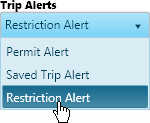
Expand the Trip Alerts drop-down and choose Restriction Alert.
In the Email Address field, enter an address to which you wish to send notification if requirements for the permit will expire within the next 7 days.

Click the Submit button to add your request to the queue.

Your request is scheduled for a specific time when Restriction Alert will analyze the route. If a previously analyzed trip fails analysis, an email alert is sent to the Carrier. The email is generated one time only to avoid inundating the Carrier's inbox.